

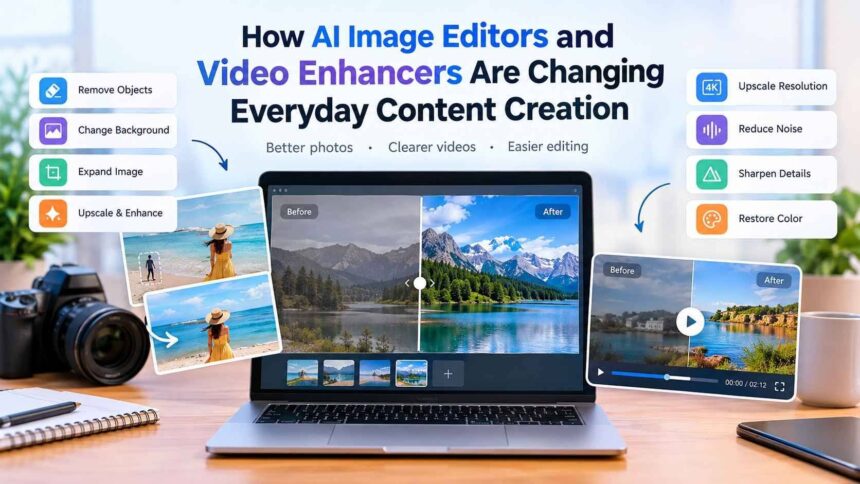
Visual content has become an essential part of communication. From social media posts and online stores to blogs, presentations, advertisements, and personal photo collections, people rely on images and videos every day. As the demand for high-quality visual content continues to grow, artificial intelligence is changing how these materials are created and edited.
In the past, improving an image or video often required professional software and considerable editing experience. Users had to understand layers, filters, masks, color correction, sharpening, cropping, and other technical processes. AI-powered tools are making many of these tasks easier by automating repetitive editing work and helping users achieve better results with fewer manual adjustments.
An AI image editor can analyze photographs and make changes such as removing unwanted objects, improving resolution, changing backgrounds, or expanding an image. Similarly, an AI-powered video enhancer can help improve low-quality footage by addressing issues such as blur, noise, color, and resolution.
These technologies are useful not only for professional creators but also for students, marketers, small businesses, photographers, bloggers, and everyday users who want to improve their visual content.
The Growing Role of AI in Visual Editing
Traditional editing software gives users extensive control over individual elements of an image or video. While this flexibility is valuable, it can also make simple editing tasks time-consuming.
Consider a photograph containing an unwanted object in the background. With conventional editing, a user may need to carefully select the object, remove it, and reconstruct the background manually. For someone without editing experience, this can be difficult.
AI approaches the problem differently. It can analyze the image, identify visual patterns, and attempt to generate a suitable replacement for the selected area. Depending on the tool and the complexity of the scene, this can significantly reduce the amount of manual work required.
The same principle applies to video enhancement. Instead of manually adjusting multiple settings, AI can analyze footage and apply improvements based on the characteristics of the video.
This does not mean traditional editing software is no longer useful. Professional designers and editors still require detailed control for complex projects. However, AI can work alongside traditional tools by handling repetitive or time-consuming tasks.
What Is an AI Image Editor?
An AI image editor is a digital editing tool that uses artificial intelligence to analyze and modify images. Instead of relying entirely on conventional filters and manual adjustments, these tools can recognize objects, backgrounds, colors, textures, and other elements within a photograph.
Depending on the software, an AI image editor may offer features such as:
- Object removal
- Background removal
- Image expansion
- Image upscaling
- Blur reduction
- Detail enhancement
- Image resizing
- Prompt-based editing
- Creative image adjustments
IObit’s online AI Photo Editor, for example, provides AI-powered editing capabilities including object removal, background removal, image expansion, and upscaling. The service also provides different aspect-ratio and resolution options, making it suitable for different types of visual content.
The usefulness of these functions depends on the original image and the type of edit being requested. A simple photograph with a clear subject may be easier for an AI system to process than a crowded scene containing many overlapping objects.
Removing Unwanted Objects From Photos
One of the most practical uses of AI image editing is removing unwanted elements from photographs.
A person walking through the background, a distracting sign, a piece of equipment, or another unwanted object can reduce the visual quality of an otherwise good photograph.
Traditional editing requires users to manually select and reconstruct the affected area. AI can automate much of this process by analyzing the surrounding pixels and generating replacement content.
This can be useful for travel photography, family photographs, real estate images, product pictures, and social media content.
However, users should always inspect the edited result. Complicated backgrounds, repeating patterns, shadows, and overlapping objects can sometimes produce unexpected results.
Changing and Removing Backgrounds
Background removal is another area where AI can save time.
For example, an online seller may need to place a product against a clean background. A social media creator might want to isolate a person from the original scene. A marketer may need the same subject in several different layouts.
Manually separating the foreground from the background can be a tedious process, particularly when the image contains hair, transparent objects, or other fine details.
AI-based background tools attempt to recognize the main subject and separate it from the surrounding environment automatically. The resulting image can then be placed on a different background or incorporated into another design.
Expanding Images With AI
Image dimensions do not always match the requirements of a particular platform.
A photograph may be too narrow for a website banner or too short for a specific social media format. Cropping can solve the problem, but it may also remove important parts of the original composition.
AI image expansion offers another option. Instead of simply cropping the photograph, the technology attempts to generate additional visual content beyond the original boundaries.
This can help transform an existing image into a different aspect ratio while maintaining a more natural composition.
The results can vary, particularly when the system has little information about what should appear outside the original frame. Users should therefore review expanded areas before publishing the final image.
Improving Image Resolution
Small or compressed images often look poor when displayed at larger sizes. Increasing their dimensions using conventional methods can result in visible pixelation.
AI-powered upscaling attempts to address this problem by analyzing the existing image and reconstructing additional visual detail.
This can be useful when working with older photographs, small website images, screenshots, or other content that needs to be displayed at a larger size.
AI cannot recover every detail that was never captured in the original image. However, it can sometimes produce a more visually convincing result than simply enlarging the image using conventional scaling.
How Businesses Can Use AI Image Editing
Visual content is important for businesses of all sizes.
An online store may need dozens or hundreds of product photographs. A marketing agency may need multiple versions of campaign graphics. A small business may regularly prepare images for social media, advertisements, newsletters, and its website.
An AI image editor can help reduce the amount of time spent on repetitive tasks.
For example, product images may require background cleanup and resizing before publication. Instead of manually performing each step, AI can automate parts of the process.
Bloggers and publishers can also use AI editing tools to prepare images for articles and websites. The ability to resize, expand, enhance, or clean up an image can make it easier to adapt existing visual assets to different publishing requirements.
Why Video Enhancement Is More Challenging
Video editing presents a different challenge because video is made up of a sequence of frames.
An improvement that looks good in one frame needs to remain consistent throughout the footage. This makes tasks such as sharpening, noise reduction, and color correction more complicated than similar adjustments on a single photograph.
Older video recordings may also contain several problems simultaneously. They might have low resolution, motion blur, digital noise, faded colors, poor lighting, or compression artifacts.
A video enhancer can analyze the footage and attempt to improve these characteristics automatically.
IObit’s AI Video Enhancer is designed for improving low-quality and blurry video. According to the product information, it supports formats such as M4V, MP4, MOV, and WebM, with specified upload limits for duration and file size.
Upscaling Low-Resolution Video
Video upscaling is one of the most useful applications of AI enhancement.
Older footage may have been recorded at a much lower resolution than modern displays support. When this footage is enlarged, it can appear soft or pixelated.
AI-based upscaling attempts to reconstruct additional details based on patterns within the original footage. Rather than simply stretching existing pixels, the system analyzes the visual information and generates an enhanced version.
IObit’s AI Video Enhancer states that it can upscale videos to 4K and beyond.
The final result still depends on the original footage. A severely damaged or extremely low-resolution video cannot necessarily be transformed into footage with the same level of detail as a modern high-end camera recording.
Reducing Noise in Video
Noise is common in footage recorded in low-light conditions or with older cameras.
Digital noise can make video look grainy and can become even more noticeable after compression or enlargement.
AI-based processing can attempt to distinguish unwanted noise from actual visual information. The objective is to produce cleaner footage without removing important details.
This balance is important. Excessive noise reduction can make faces, hair, clothing, and textures look unnaturally smooth.
For this reason, users should always compare the processed footage with the original before deciding whether the enhancement is actually an improvement.
Improving Sharpness and Clarity
Slightly blurry footage can sometimes benefit from sharpening and detail enhancement.
Traditional sharpening applies adjustments based on predefined settings. AI-powered systems can instead analyze the content and attempt to determine which areas represent meaningful edges or details.
This can make certain objects appear clearer and improve the overall perception of quality.
However, sharpening has limits. If the original video contains severe motion blur or was significantly out of focus, enhancement cannot always restore the missing information accurately.
Restoring Color in Older Footage
Color can change significantly over time, particularly in older recordings.
Some videos may look faded, washed out, too dark, or lacking in contrast. AI enhancement can analyze the color and brightness characteristics of the footage and attempt to produce a more balanced appearance.
IObit lists color restoration as one of the capabilities of its AI Video Enhancer, along with adjustments involving brightness and contrast.
This type of enhancement can be particularly useful for archived family videos, older recordings, and footage that was captured under difficult lighting conditions.
Using AI to Preserve Old Photos and Videos
AI enhancement has applications beyond social media and commercial content.
Many people have old family photographs stored in albums, boxes, or digital folders. These photographs may be small, faded, scratched, or blurry. Old home videos can have similar limitations.
AI tools can help improve the appearance of these materials for modern screens.
For example, an old photograph can potentially be upscaled and sharpened before being printed or displayed digitally. Old video footage may benefit from noise reduction, color improvement, and resolution enhancement.
Although AI cannot perfectly recreate information that has been permanently lost, it can make existing material more useful and easier to view.
This makes AI enhancement an interesting tool for digital preservation.
AI Tools and Traditional Editing Software Can Work Together
AI editing should not necessarily be viewed as a replacement for conventional editing software.
Professional applications remain important when users need detailed control over layers, masks, typography, color grading, audio, transitions, and other elements.
A practical workflow can combine both approaches.
First, the user can apply AI enhancement to address common problems. The resulting file can then be imported into traditional editing software for more detailed adjustments.
A typical workflow could be:
- Start with the original image or video.
- Identify the main quality problems.
- Apply AI-based enhancement.
- Compare the processed version with the original.
- Make manual corrections if necessary.
- Export the final version in the required format.
This approach allows AI to handle repetitive processing while the user remains responsible for the creative and technical decisions.
What to Consider Before Using AI Editing Tools
Choosing an AI editing tool involves more than looking at the number of available features.
Users should check supported file formats, upload limits, output quality, processing requirements, privacy practices, and terms of use.
Online tools can be convenient because they do not necessarily require a powerful computer. However, using an online service means that users may need to upload their files to a remote server.
For example, IObit’s AI Photo Editor provides information about supported image formats and explains its handling of uploaded images. Users should review the current privacy policy and service terms before uploading confidential or sensitive material.
Output quality is another important consideration. AI-generated details can sometimes appear convincing while being inaccurate. This matters particularly when working with faces, product labels, documents, text, or other details where precision is important.
Checking the final image or video at full resolution can help identify these issues.
Responsible Use of AI-Enhanced Visual Content
The growing accessibility of AI editing also creates a responsibility for users.
There is an important difference between improving the technical quality of a photograph and changing its meaning.
For personal photographs, removing an unwanted background object may be perfectly reasonable. However, in journalism, research, documentation, advertising, or other contexts where visual accuracy matters, significant AI-generated alterations may create a misleading impression.
Users should also consider copyright and licensing requirements. An AI editing tool does not automatically give someone permission to use an image they do not own.
The safest approach is to edit content that the user owns or has permission to modify and publish.
How AI Could Change Content Creation Further
AI-powered visual tools are likely to become more integrated into everyday creative workflows.
Future systems may provide more precise object recognition, improved restoration, better consistency across video frames, and more natural editing through conversational instructions.
Instead of searching through menus to find a particular adjustment, users may increasingly describe the desired result in ordinary language.
This could make sophisticated editing accessible to people without formal training.
At the same time, human judgment will remain important. AI can process visual information quickly, but users still need to decide whether an edit is appropriate, accurate, and visually convincing.
The most effective approach is likely to combine AI automation with human creativity.
Final Thoughts
AI is changing visual editing by making many previously complicated tasks faster and more accessible. An AI image editor can assist with object removal, background changes, image expansion, upscaling, and other common adjustments. A video enhancer can similarly help improve low-resolution footage, reduce noise, sharpen details, and restore color.
These tools are useful for a wide range of people, from professional creators and businesses to students and individuals working with personal photographs and old recordings.
However, AI enhancement should not be treated as a guarantee of perfect results. The quality of the original material, the complexity of the scene, and the type of requested edit all influence the final outcome. Reviewing AI-processed content remains an important part of the editing process.
Ultimately, the value of AI in visual content creation comes from combining automation with human judgment. AI can handle repetitive technical work, while users remain responsible for creative decisions, accuracy, privacy, and responsible use. As the technology continues to improve, image and video editing is likely to become increasingly accessible without eliminating the value of human creativity and oversight.