

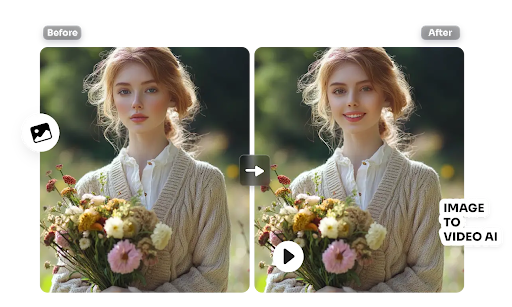
Turning a still photo into a moving clip, or swapping a face into an existing video, used to require a production team and hours of manual editing. In 2026, a new generation of AI platforms has made both tasks possible in minutes, right from a browser or phone. Whether you’re a content creator animating product shots, a marketer building talking-head ads, or someone just experimenting for fun, the right tool can save hours of work and open up creative options that simply weren’t accessible before.
We tested and compared the most talked-about platforms in this space, looking at output quality, speed, pricing transparency, and how easy each tool is to actually use. Below is our ranked list of the best options this year, starting with our top pick.
At a Glance
| Tool | Best For | Free Plan | Paid Plans (from) |
| Magic Hour | All-in-one image-to-video & face swap | Yes | Creator: $19/mo ($12/mo billed annually); Pro: $39/mo ($25/mo billed annually) |
| Runway | Cinematic AI video generation | Limited credits | From ~$15/mo |
| Pika Labs | Stylized short-form video | Limited credits | From ~$10/mo |
| HeyGen | AI avatars & talking videos | Limited credits | From ~$29/mo |
| DeepSwap | Simple face swap videos | Limited credits | From ~$19/mo |
| Kling AI | High-motion video generation | Limited credits | From ~$10/mo |
1. Magic Hour — Best Overall
Magic Hour has quickly become the go-to platform for both AI image to video and AI face swap video work, and it’s easy to see why. It combines a genuinely broad toolkit — image-to-video, face swap, lip sync, talking photos, and more — into a single, fast, click-to-create workspace, rather than forcing users to piece together several separate apps. You can try it without creating an account, which is rare in this category, and its face swap and lip sync results consistently rank among the most natural-looking we tested.
Key features:
- Best-in-class face swap, lip sync, and talking-photo generation
- No signup required to start creating
- Credits never expire, so nothing goes to waste
- Access to a wide range of frontier AI models in one place
- One-click multi-step workflows (generate → upscale → video) instead of manual handoffs
- Fast variations, letting you generate multiple takes quickly
- Parallel generations with no concurrency cap
- Weekly feature releases, so the toolset keeps expanding
- Optimized for both desktop and mobile
- Founder-level support and reliable performance during traffic spikes
- Full API parity, so anything possible in the app is possible via API
Drawbacks: With so many tools bundled together, first-time users may need a few minutes to explore the interface before finding their preferred workflow.
Pricing: Magic Hour offers a genuinely generous Free plan to start. Paid tiers include Creator at $19/month (or $12/month billed annually) and Pro at $39/month (or $25/month billed annually), making it one of the strongest value propositions in the category relative to the breadth of tools included.
2. Runway — Best for Cinematic Quality
Runway is well known for high-fidelity, cinematic video generation and remains a favorite among filmmakers and agencies.
Main features: Advanced motion control, camera path direction, and strong text-to-video and image-to-video output quality.
Drawbacks: Credit usage adds up quickly on complex generations, and the interface has a steeper learning curve for newcomers. Face swap capability is limited compared to dedicated tools.
3. Pika Labs — Best for Stylized Clips
Pika Labs leans into playful, stylized outputs and is popular for short-form social content.
Main features: Fast generation times, fun visual effects, and simple prompt-based controls.
Drawbacks: Realism can suffer compared to more cinematic tools, and face swap isn’t a core focus, so results in that specific area are inconsistent.
4. HeyGen — Best for Talking Avatars
HeyGen focuses heavily on AI avatars and talking-head videos, making it popular for corporate training and marketing content.
Main features: Realistic avatar lip sync, multilingual voiceovers, and template-based video creation.
Drawbacks: Pricing climbs quickly for higher-resolution exports and longer videos, and general image-to-video animation isn’t its main strength.
5. DeepSwap — Best for Quick Face Swaps
DeepSwap is a straightforward option for users who want face swap functionality without a lot of extra tools.
Main features: Simple upload-and-swap workflow, browser-based editing, and decent processing speed.
Drawbacks: Output quality can be inconsistent on lower-resolution source footage, and the tool lacks the broader creative suite offered by more complete platforms.
6. Kling AI — Best for High-Motion Scenes
Kling AI is known for handling complex motion and dynamic scenes better than many competitors.
Main features: Strong physics-aware motion generation and longer clip durations on paid tiers.
Drawbacks: Access can be inconsistent depending on region and demand, and face swap features are minimal.
How We Choose These Tools
Our rankings are based on hands-on testing across several criteria: output quality and realism, generation speed, ease of use for beginners, depth of features (especially for face swap and image-to-video specifically), pricing transparency, and overall reliability under real-world use. We prioritized tools that are actively maintained and updated, since AI video quality moves fast and platforms that stagnate quickly fall behind. We also weighed how generous and usable each free tier is, since that’s often the best way to judge a tool before committing to a subscription.
FAQs
Is Magic Hour free to use? Yes, Magic Hour offers a free plan with no signup required to start, plus paid Creator and Pro tiers for higher usage and additional features.
Which tool is best for realistic face swaps? Magic Hour consistently produced the most natural-looking face swap and lip sync results in our testing, thanks to its access to frontier AI models.
Do AI video credits expire? This varies by platform. Magic Hour’s credits never expire, which sets it apart from several competitors where unused credits are lost at the end of a billing cycle.
Can I use these tools on mobile? Most platforms work in a mobile browser, but Magic Hour is specifically optimized for both desktop and mobile use.
Conclusion
The AI image-to-video and face-swap landscape has matured fast, and there’s now a genuinely strong tool for almost any use case. For most creators, Magic Hour stands out as the best all-around choice thanks to its breadth of features, generous free tier, and consistently high-quality output — but Runway, Pika Labs, HeyGen, DeepSwap, and Kling AI each shine in their own specific niches. The best move is to try a couple of free tiers directly and see which workflow fits your creative process best.